
SMS Character Limits: ASCII vs. Unicode
In SMS, not all characters (letters, numbers, symbols) play by the same rules. Some allow messages to have 160 characters, others quietly cut that limit down to 70.
The reason? The character limit is determined by the characters you’ve typed in. Are they ASCII or Unicode? This article will help you determine the difference and the consequenses.
First Things First: What’s ASCII?
ASCII (pronounced ask-ee) is the original SMS character set. Think of it as the “basic alphabet” of texting.
It includes:
- A–Z
- 1-2
- a–z
- 0–9
- Basic punctuation (! . , ?)
In short, all of the letters, numbers and symbols you can see on the keys of a QWERTY keyboard.
Good News: If your message only uses these characters, your messages can be 160 characters long.
Bad News: No winky faces or smiley faces that don’t look like ;-).
So What’s Unicode?
Unicode is the global language of characters.
It includes all the other stuff, like:
- Emojis 😊
- Special symbols ™ © ®
- Accented letters (é, ñ, ü)
- Non-Latin scripts, e.g., Chinese or Japanese symbols
- Fancy punctuation like curly quotes “ ”
Good News: Unicode allows messaging across languages and devices worldwide. It’s powerful. It’s inclusive. It’s very necessary.
Bad News: When your message includes even one Unicode character, SMS limits the count of one message to 70 characters.
Example:
ASCII Message
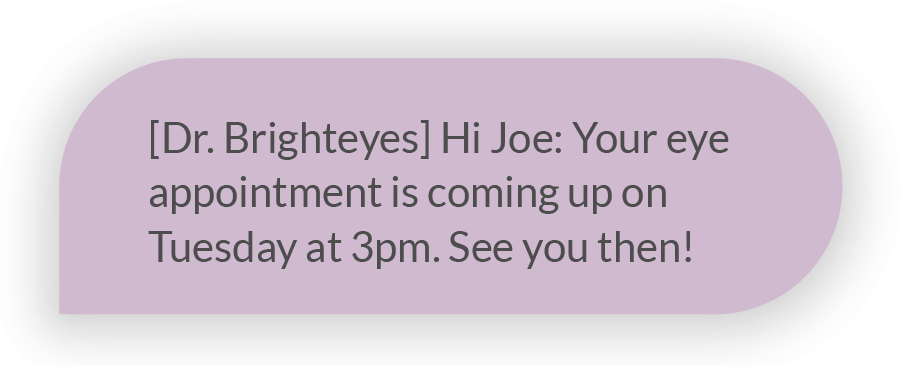 Character count: 91
All ASCII characters and well under 160 count, making it one message.
Unicode Message
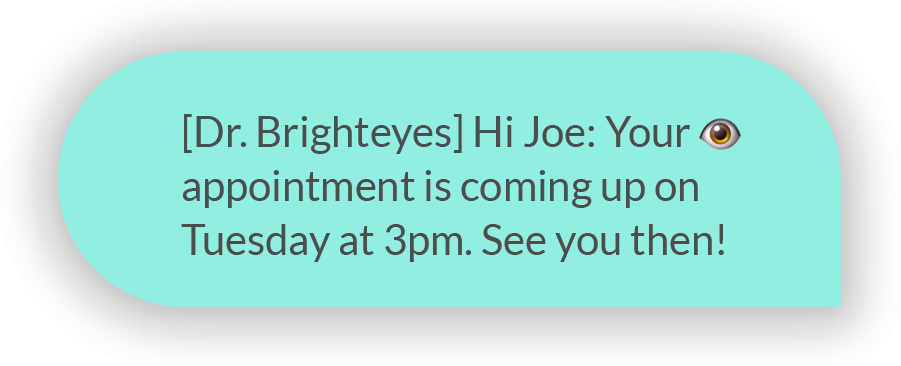 Character Count: 89
Just by adding one unicode character, in this case the eye emoji, its now considered a unicode message. Limiting each message to 70 characters. So the 89 character message is a two-part message.
Why This Matters for Businesses
If you’re sending appointment reminders, alerts, delivery confirmations or really any other business communication to multiple people every day, your costs could be doubling or tripling if you’re sending any unicode characters in your messages, due to character limitations. If they are longer then 70 characters they will be split into parts. You get charged for each message part. So if you’re sending seemingly ASCII messages at one part, but it has an unknowing unicode character splitting the message into two, you’re paying double of what you’re expecting. Even if your providers are able to send all of the characters into one message bubble its still considered 2 parts.
In turn, if you’re sending thousands of messages you think are only one part, but it has, say, the trademark symbol ™, the costs could be a shock when you get your SMS invoice.
So… Should You Avoid Unicode?
Absolutely not, there are many reasons to use Unicode; when sending proper names with accent marks out of respect or international messages that use characters outside of the ASCII options, or even emojis for emphasis. Just be intentional and aware of how those characters will affect your message format and length to avoid sending cost surprises.
Where Hidden Characters Sneak In (And Why Copy/Paste Can Change Everything)
Here’s something most people don’t realize:
You can draft a perfectly “ASCII-friendly” message in Microsoft Word…then copy and paste it into your SMS platform…and suddenly it becomes…dun, dun, DUN…a unicode message.
Wait — how?
Because word processors often use special formatting characters behind the scenes.
Common culprits include:
- Curly quotation marks “ ”
- Smart apostrophes ’
- Long dashes — (instead of a simple hyphen -)
- Non-breaking spaces
- Special bullet formatting
- Invisible formatting characters
Even though these are symbols and formats we use in day to day communications, SMS sees them as Unicode.
And once even one hidden character appears in your message, the entire text switches encoding.
Why This Happens
Microsoft Word (and many email platforms) automatically “upgrade” plain punctuation to more stylistic versions. Good for letters and documents, bad for SMS.
For example:
Straight quotes: “Hello”
Curly quotes: “Hello”
To a human? Same thing.
To SMS encoding? Very different.
Lesson Summary: Before copying and pasting from Word, a formatted email, or content from a website, first paste it into a plain text editor like Notepad, from there you can copy and paste into your SMS software, this will strip out the fancy or hidden stuff, leaving you with an ASCII-safe message format.
How CompleteSMS Helps
When using the CompleteSMS web portal to send SMS, you don’t have to guess.
Our platform:
- Tracks character count in real time
- Shows message segmentation clearly
- Informs you when a unicode character’s been introduced
- Keeps your messaging transparent and predictable
Whether you’re sending plain-text reminders or emoji-filled campaigns, you’ll know exactly what you’re sending — and how it counts.
Because texting should be simple. Even when the math isn’t.
Quick Takeaways
- ASCII = 160 characters per SMS
- Unicode = 70 characters per SMS
- Emojis and special characters trigger Unicode
- Unicode is powerful — just plan for the character impact
It’s not about eliminating personality.
It’s about knowing how the system reads it.