
MMS Sending Limits Explained: File Sizes, Formats, and Costs
MMS gives your business texts a little more to work with. Photos, graphics, and other supported media can help you share project updates, distribute visual checklists, or keep employees informed about what’s happening
But before you attach that enormous high-resolution photo, you should review these quick guidelines.
File size, media format, carrier compatibility, and cost can all affect whether your message reaches its destination as intended. The good news? A few practical guidelines can help you avoid common headaches.
Let’s get into it.
What Can You Send with MMS?
MMS stands for Multimedia Messaging Service, and it lets you send text with supported media. Exactly what you can send depends on your messaging platform and the receiving carrier.
Common media types:
- JPEG and PNG images: Good choices for photos, diagrams, screenshots, and informational graphics.
- Animated GIFs: Useful for short animations or visual demonstrations when supported.
- Video and audio: Some MMS services support these formats, but compatibility and file-size restrictions can be more limiting.
- Other file types: Certain services support additional attachments, such as contact cards or PDFs, but availability varies.
For the broadest practical compatibility, start with a common image format and keep the file reasonably small. If you’re planning to send something other than an image, check your messaging provider’s supported formats first and do a test run.
And remember: just because a file opens perfectly on your computer doesn’t mean every mobile network will deliver it without a hitch.
MMS File-Size Limits: How Big Is Too Big?
There’s no single file-size limit that applies to every MMS message. Most messaging providers set an upload or attachment limit designed to accommodate as many carriers as possible, often accounting for the most restrictive carrier requirements. Since carriers have different limits, the maximum size can also vary by media type, destination, and number type. Some allow larger image attachments than video or other files, while others may resize supported images automatically.
So, what’s the safest approach?
Keep your media small enough to travel comfortably.
A few practical tips:
- Resize large photos.
A full-resolution image from a modern smartphone is often much larger than necessary for a text message. - Compress images when appropriate.
You usually don’t need print-quality resolution to show someone a parking entrance or a maintenance issue. - Keep videos short and lightweight.
Video files can quickly exceed the limits supported by a carrier. - Test before sending at scale.
Send a test message to representative devices and destinations before rolling out a large batch.
A useful rule of thumb is to aim for a compact attachment rather than the largest file your platform accepts.
CompleteSMS accepts one image, video or audio file up to 5MB, and other downloadable files like pdfs or .csvs no larger than 600kb. One file per outgoing message, but most carriers allow for more than one per incoming message. But if you have any questions, talk with CompleteSMS support, they’re always happy to help you test your workflow before sending.
What About Character Limits?
MMS and SMS handle message length differently, so it’s worth understanding the distinction.
A standard SMS message typically accommodates up to 160 characters using the basic GSM character set, or 153 per segment for longer messages. Certain characters and languages use different encoding, these are referred to as unicode and only allow 70 characters per message or 67 per segment or part for longer messages. CompleteSMS limits SMS characters to 765 GSM characters or 335 unicode characters both of these would equal five (5) SMS.
MMS has its own text-body limits, which depend on the messaging service and implementation. Most providers support text bodies of up to 1,600 characters, CompleteSMS is in this camp, but you shouldn’t assume that figure applies to every platform.
But as a reminder: a longer MMS message isn’t automatically a better one. TL;DR applies here just as it does with SMS, people don’t want to get a wall of text in a message.
Keep your text focused, explain why the attachment matters, and make it easy for the recipient to understand what to do next. Your readers will thank you. Well, perhaps not literally, but they might at least read the whole thing.
Will MMS Work on Every Phone and Carrier?
Not necessarily, but it doesn’t mean it has to be a smart phone.
MMS delivery depends on factors that can include:
- Whether the recipient’s carrier supports MMS from your sending number type.
- Whether the destination country and network support the message.
- Whether the recipient’s device can receive the media format.
- Whether the attachment meets the relevant size and content requirements.
International messaging can introduce additional restrictions, and support for MMS isn’t identical across every destination.
CompleteSMS has a solution for MMS sent to countries that don’t support traditional MMS, we will convert the MMS into a text only message that includes a link to a webpage that will allow the recipient to see the message and image or file. That being said, there will still be some countries or carriers that will not allow either format.
So, if your business sends messages internationally, check destination-specific support before assuming a particular media workflow will work everywhere.
It’s also worth remembering that a message can be accepted by your messaging platform without successfully reaching the recipient. Delivery depends on the downstream carrier and other factors outside your providers’ or your direct control.
How Much Does MMS Cost?
MMS costs more than a standard text message, so it’s worth factoring the difference into your messaging plans to make sure your budget’s ready for it.
With CompleteSMS, MMS is billed at three times the SMS rate when used. That means you should consider whether the media adds enough value to justify the additional cost.
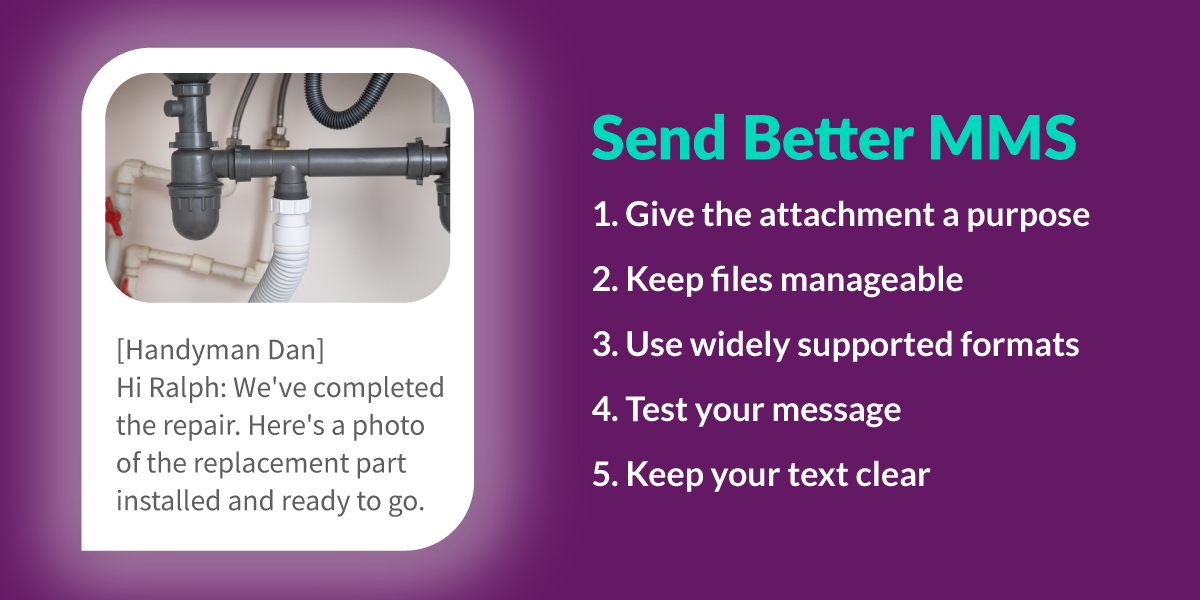
For example, a photo showing a technician’s completed work might save a follow-up call or provide useful documentation saving you money in the long run. While a picture attached to a routine appointment reminder that already says everything necessary? Probably less essential.
The goal isn’t to avoid MMS. It’s to use it when it improves the communication.
If you’re planning to send MMS in large volumes, review your account’s applicable rates and consider the expected number of messages before launching.
Five Tips for Sending Better MMS Messages
You don’t need a complicated strategy to get useful results from MMS. Start with these five habits.
- Give the attachment a purpose.
Before including a photo or graphic, ask whether it helps the recipient understand or act on your message. - Keep files manageable.
Resize and compress media when appropriate. Smaller files are generally easier to accommodate across different carrier restrictions. - Use widely supported formats.
JPEG, PNG and GIF are sensible starting points for images and video. Check platform requirements before relying on less common formats. - Test your messages.
Verify that your media displays as expected on representative devices and networks. If you send internationally, test the destinations that matter to your business. - Keep the text clear.
Tell recipients what they’re looking at and why it matters. A picture may be worth a thousand words, but a short explanation still helps.
Put MMS to Work with CompleteSMS
MMS gives businesses another way to share useful information through text. It can help service teams communicate visually, property managers share practical updates, and organizations provide instructions people can reference on their phones.
The trick is knowing when media adds value, keeping attachments within the limits your messaging service and carriers support, and understanding the associated costs.
CompleteSMS gives you the option to incorporate MMS into your business messaging, including bulk and scheduled messaging (up to 30 days out).
Ready to explore MMS for your business? Get in touch with CompleteSMS to ensure your account has MMS enabled to get started.