

Summary
Quick Overview
While in-app messaging and push notifications support customer engagement, SMS provides a more reliable way to deliver time-sensitive communications. By integrating business SMS into an existing messaging strategy, businesses can improve customer reach, deliver critical updates, and facilitate two-way communication without relying on app usage or internet connectivity.
App-based messaging sounds great on paper.
You build a sleek app, add notifications, maybe throw in a fancy little chat widget, and suddenly communication should be effortless…right?
Not exactly.
App-based messaging has a couple of major weaknesses: People have to use the app to see the in-app messages and/or allow notifications for the push notifications to reach them. (How many of you allow your apps to send notifications? I can tell you I mark no every time.)
Enter business SMS.
The Problem with In-App and Push Notifications
In-app messaging works great when users are already in your app. If someone is browsing, booking an appointment, placing an order, or checking their account, an in-app message can be incredibly effective.
Once they leave your app, in-app messages are basically sitting in an empty room talking to themselves.
Push notifications can reach users even when they’re not actively using your app. But here’s the catch — customers have to allow them. A May 2026 YouGov survey found that 69% of U.S. adults disable at least some of their phone notifications, and only 26% leave most notifications enabled. Meanwhile, industry benchmarks show that a significant portion of app users never opt in to push notifications at all.
That’s not ideal when a delivery driver is outside, a payment fails, fraud is detected, or a customer needs an answer. Waiting for someone to open your app again isn’t exactly a winning sales strategy.
You need your message seen. Now.
What’s the difference between In-App Messages and Push Notifications?
They’re easy to confuse, but in-app messages and push notifications work differently. The biggest distinction is where they appear.
In-App Messages
In-app messages are messages shown while someone is actively using your app. They might show up as pop-ups, tool tips, chat prompts and product walkthroughs.
They’re great for engaging users who are already there, whether you’re introducing a new feature, guiding someone through onboarding, or promoting an upgrade.
But, if the app doesn’t get opened, the message isn’t getting seen.
Push Notifications
Push notifications are alerts sent directly to a user’s device, even when the app isn’t open. They typically appear on the lock screen or in the notification center, making them useful for reminders, updates, alerts, and encouraging users to return to the app.
But users can disable them, devices can silence them, and too many notifications can lead to notification fatigue.
Neither channel is inherently better. They just serve different purposes, and both depend on the customer having your app.
Why SMS Still Wins Attention
SMS has one massive advantage over in-app messaging — text messages don’t require users to first remember you exist.
A text can reach someone without requiring them to:
- Open an app or log in.
- Enable push notifications.
- Download the latest update.
- Connect to Wi-Fi.
- Keep your app on their home screen.
- Even own a smartphone.
A text message simply shows up and has a touted 98% open rate.
App-based messaging vs. SMS: Why Your Business Needs Both
We’re not saying abandon push notifications or in-app messaging. They each have a place. The trick is knowing which channel is right for the message.
In-app messaging and push notifications are great for engagement. They’re useful for onboarding, feature announcements, tutorials, upsells, and keeping users connected to your app. Push notifications can also deliver timely reminders and updates, especially when your app is already part of someone’s routine.
SMS is better suited for messages that need to be seen and acted on. Think time-sensitive alerts, appointment reminders, real-time updates, support conversations, and notifications that need a response. When timing matters, you don’t want to depend on someone opening an app or having push notifications enabled.
 Consider a fitness app:
A push notification might say:
“Hey, ready for today’s workout?”
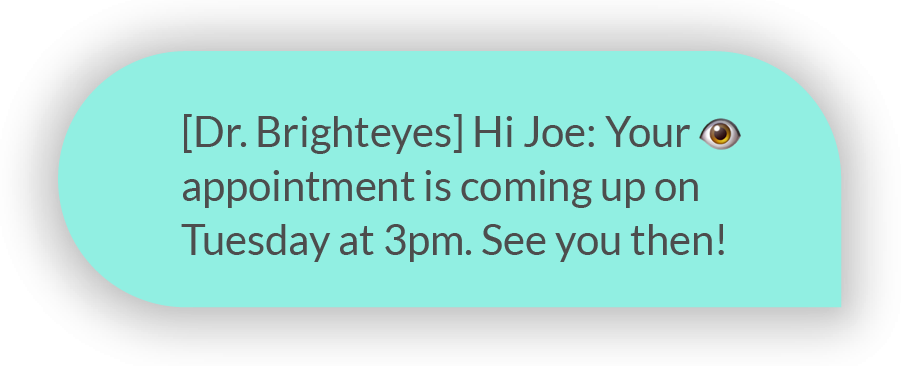
An SMS might say:
“Your class starts in 30 minutes.”
One encourages engagement. The other communicates something the customer needs to know.
The best communication strategies don’t force businesses to choose one channel over another. They use each where it works best.
Think of in-app messaging as the helpful employee standing inside the store, and SMS as the person waving you down before you drive past it.
Both matter.
The smartest communication strategies combine all three:
- In-app messaging for engagement.
- Push notifications for reactivation and routine updates.
- SMS for time-sensitive communication and messages that need a response.
Give Your App a Way to Reach Beyond Itself
Your app doesn’t have to do all the talking. In-app messaging keeps users engaged, push notifications encourage them to come back, and SMS helps get important messages through when neither is an option.
CompleteSMS gives your business a way to send texts alongside the apps, platforms, and software you already use. Send appointment reminders, customer updates, time-sensitive alerts, and two-way messages without asking customers to download another app, create another login, or remember to check one more notification.
Whether you’re connecting through our API, automating messages through your existing software, or sending texts directly from our web portal, CompleteSMS helps keep customers and employees in the loop.
Your app can handle the experience. Let CompleteSMS help handle the messages that can’t wait.
Ready to add SMS to your app experience?